No wires? No problem! Point-to-point Wireless Revolutionises Connectivity for Every Business
In today’s fast-paced digital world, having a reliable and extensive network is crucial for the success of any business. However, the physical limitations of laying down ethernet cables between buildings can pose significant challenges, especially in areas where it is not practical or feasible. This is where point-to-point WiFi and the airMAX NanoBeam 5AC come to the rescue, offering a cutting-edge, wireless solution that can bridge the gap between buildings seamlessly and efficiently.
Why Choose Wireless Networking?
As businesses grow and expand, the need to extend network connectivity to multiple buildings becomes inevitable. While reliable, traditional wired connections can be cumbersome and expensive, particularly in scenarios where buildings are far apart or the terrain makes cable installation difficult.
Wireless networking offers several advantages:
- Cost-effective: Eliminates the need for expensive cable laying and trenching.
- Flexibility: Easily adaptable to changing business needs and expansions.
- Ease of installation: Quick and hassle-free setup.
- Reduced downtime: Fewer physical components mean fewer points of failure.
Introducing the airMAX NanoBeam 5AC
The airMAX NanoBeam 5AC is a powerful point-to-point WiFi device that allows businesses to extend their network over long distances wirelessly. With a theoretical range of up to 10 kilometres, this innovative technology ensures robust, high-speed connectivity between buildings without needing physical cables.
Source: Unifi
Key Features of the airMAX NanoBeam 5AC
The NanoBeam 5AC is designed to deliver exceptional performance and reliability. Here are some of its standout features:
- Long-range connectivity: Can transmit data over distances of up to 10 kilometres.
- High-speed performance: Supports high data transfer rates, ensuring smooth and fast connectivity.
- Compact design: Sleek and unobtrusive, making installation easy even in tight spaces.
- Durable and weather-resistant: Built to withstand harsh environmental conditions, ensuring reliable performance in any weather.
- Easy installation: The simple setup process allows businesses to get up and running quickly.
Case Study: Expanding Connectivity in a Rural Area
Recently, we had the opportunity to implement the airMAX NanoBeam 5AC point-to-point wireless at a client’s site in a rural area. The client faced significant challenges in extending their network across multiple buildings. Running ethernet cables was not a viable option due to the distance and the terrain.
The Challenge
The client’s primary concern was providing reliable internet access across their entire site to support their day-to-day operations and implementing a Teams Voice over IP (VoIP) phone system. They needed a solution offering high-speed connectivity, minimal downtime, and the flexibility to adapt to their growing needs.
Additionally, while Starlink is an excellent solution for rural internet, it is not ideal for VoIP out of the box due to its latency. To combat this, we needed to implement a new firewall that was capable of prioritising VoIP traffic to ensure call quality was acceptable.
The Solution
We recommended the airMAX NanoBeam 5AC as the ideal solution to address these challenges. The installation process was straightforward:
- First, we conducted a site survey to determine the optimal locations for the NanoBeam devices.
- Next, we installed the NanoBeam 5AC units on the buildings, ensuring a clear line of sight between them.
- We configured the devices to establish a secure and high-speed wireless link between the buildings.
- We implemented a new firewall and configured rules to prioritise the VoIP traffic to the Teams servers.
- Finally, we tested the connection to ensure seamless performance and reliability.
The Results
The results were impressive. The client now enjoys uninterrupted internet access across their entire site, allowing them to operate efficiently and effectively. The high-speed connectivity provided by the NanoBeam 5AC enabled the successful implementation of a VoIP phone system, enhancing their communication capabilities.
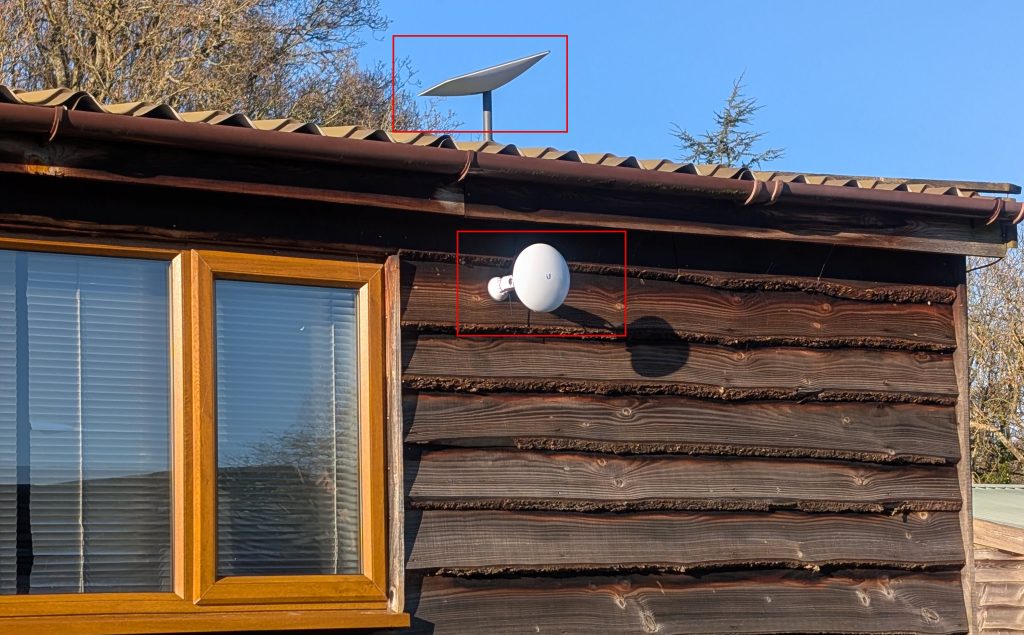
As you will see from the images below, the devices are inconspicuous and no more prominent than a regular WiFi access point.

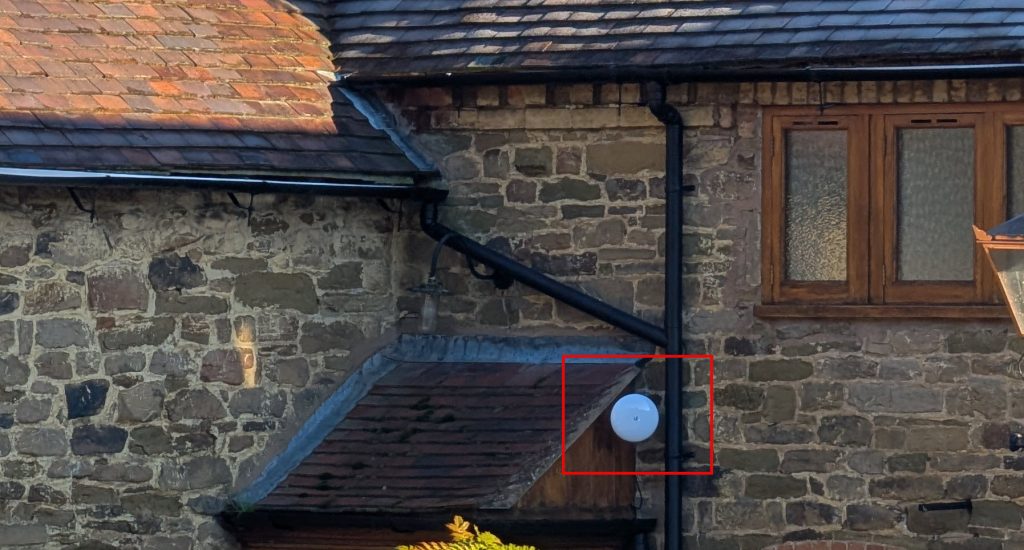
Also of note is that this site is completely off-grid from an internet perspective, as there is no FTTC or FTTP internet available in this rural location. Therefore, the client has installed StarLink satellite internet, which you can see in the image below, making this a truly wireless setup.
Benefits of the airMAX NanoBeam 5AC Point-to-Point Wireless
The airMAX NanoBeam 5AC point-to-point wireless offers several benefits that make it an excellent choice for businesses looking to extend their network wirelessly:
- Enhanced productivity: Reliable and high-speed connectivity ensures smooth and efficient operations.
- Cost savings: Eliminates the need for costly cable installations and maintenance.
- Scalability: Easily expandable to accommodate future growth and additional buildings.
- Improved communication: Supports VoIP systems, enabling better internal and external communications.
- Minimal disruption: Quick and easy installation minimises downtime and disruption to business operations.
Conclusion
In conclusion, point-to-point wireless using the airMAX NanoBeam 5AC is a game-changer for businesses looking to extend their network wirelessly between buildings. Its long-range connectivity, high-speed performance, and ease of installation make it an ideal solution for overcoming the physical limitations of traditional wired connections. Whether in urban or rural settings, the NanoBeam 5AC ensures that businesses can stay connected and operate smoothly, regardless of the challenges their environment poses.
Our recent installation at a client’s site in a rural area demonstrates the practical benefits of this technology. By leveraging the power of the NanoBeam 5AC, we were able to expand their internet access across the entire site and implement a VoIP phone system, significantly enhancing their productivity and communication capabilities.
If your business is facing similar challenges, consider the airMAX NanoBeam 5AC as a reliable and efficient solution to extend your network wirelessly. Embrace the future of connectivity and unlock the full potential of your business operations. If you would like to discuss further, please get in touch.